CorpSync Release Notes
Highlights of the Latest Features and Enhancements
1. New Dashboard with Graphs
The revamped dashboard now features visually informative graphs, providing an at-a-glance overview of essential metrics and trends. Administrators benefit from a user-friendly interface that simplifies data analysis and interpretation, empowering quick decision-making. The dashboard includes:
- Contact Sync Subscription Box: Easily monitor active contact sync subscriptions.
- Signature Subscription Box: View and manage signature subscriptions for users.
- Calendar Subscription Box: Track calendar integration subscriptions.
- Mass SMS subscription Box: Oversee mass SMS communications and subscriptions.
- Contact Change Graph: Visualize recent contact updates and modifications.
- Subscriber Change Graph: Track changes in subscriber numbers and engagement.
- Recent Contact Update List: Quickly review the latest contact updates.
- Recent Mass SMS Queue or Sent: Monitor queued and sent SMS campaigns.
- Billing Information Box: Access up-to-date billing and subscription details.
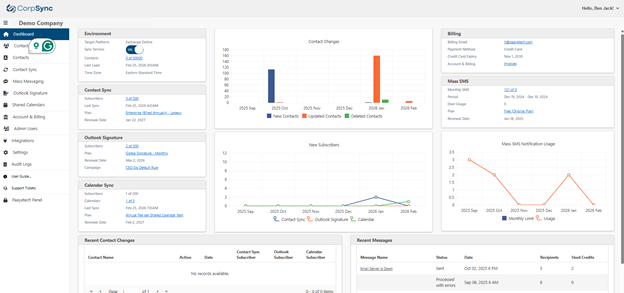
New Dashboard
2. Separation of Subscription Rules from Groups
Subscription rules are now managed independently on a dedicated screen under Contact Sync > Rules Tab. This separation helps administrators distinguish between group settings and subscription logic, providing a clearer, more intuitive management experience. The underlying functionality remains unchanged, but the interface is more streamlined and accessible.
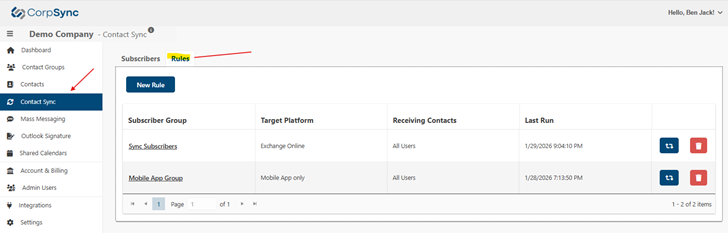
Contact Syn Rules
3. Contact Sync Enhancements
The contact sync process has been significantly optimized, resulting in faster performance and greater efficiency. These improvements reduce wait times and ensure that contact information is updated promptly, supporting smoother operations for all users.
Now the "Disabled" users will be removed from the contact list automatically. Administrator doesn't need to remove the user from a groups. Marking a user as "Disabled" in Microsoft Entra will ensure the contact lists and subscriber lists automatic cleanup.
4. Display Last Group Refresh Date and Time
Each group now displays the most recent refresh date and time, giving administrators improved visibility for tracking group activity and ensuring data accuracy across the platform.
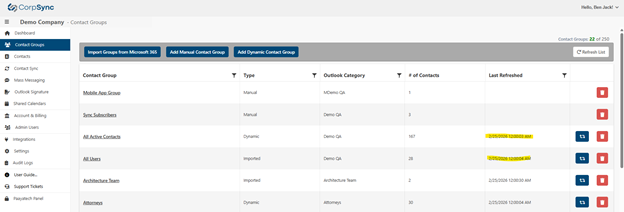
Contact Groups
5. Advanced Signature Field Display Logic
The Signature feature now leverages advanced logic to determine when fields are displayed or hidden, allowing for more dynamic and personalized signatures. Users can tailor signatures to reflect their roles, departments, or other criteria, ensuring professional and relevant communication.
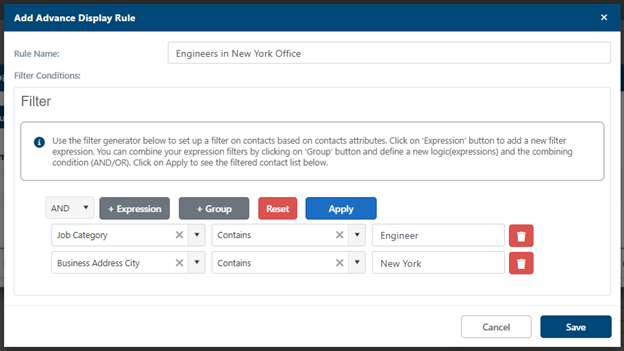
Signature Advance Display Rule
6. Calendar Sync Enhancements
Calendar sync now offers robust new options, such as colour coding for improved visibility and organization. Administrators can choose to push events to the main calendar or create separate calendars for each subscriber, supporting flexible scheduling and clear separation of events.
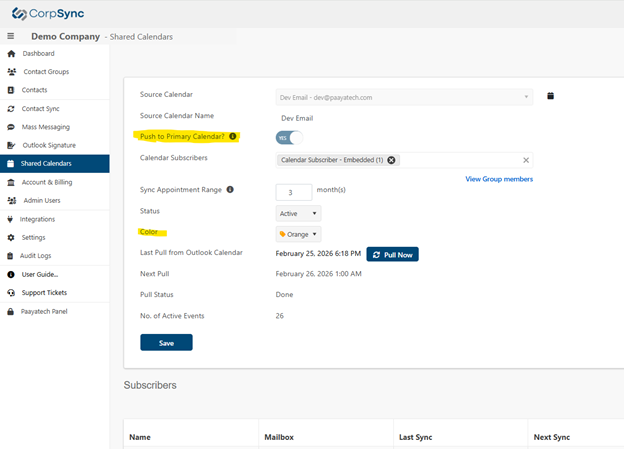
Sync Calendars – New Settings
7. Enhanced Group Member Viewing
Viewing group membership is now easier from various screens, including the Subscription screen. This enhancement streamlines workflows and ensures that group member information is always accessible, reducing the time spent navigating between sections.
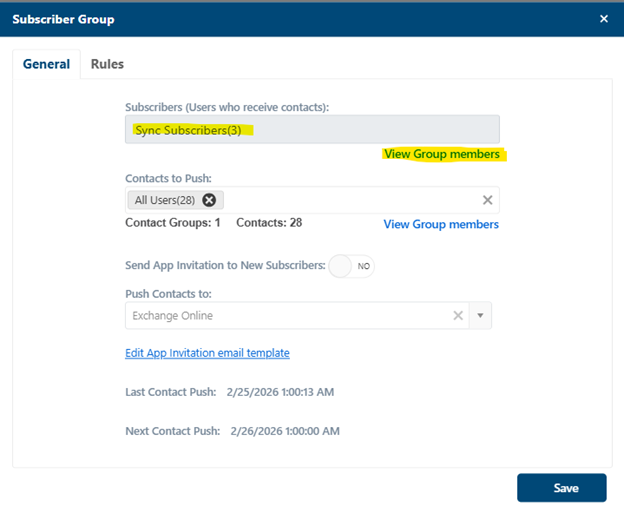
Link to view Group Members
8. Improved Signature WYSIWYG Editor
The Signature WYSIWYG editor has been upgraded, providing a smoother editing experience. Users can now easily design and format signatures, with enhanced tools for styling and layout, ensuring signatures look professional and consistent.
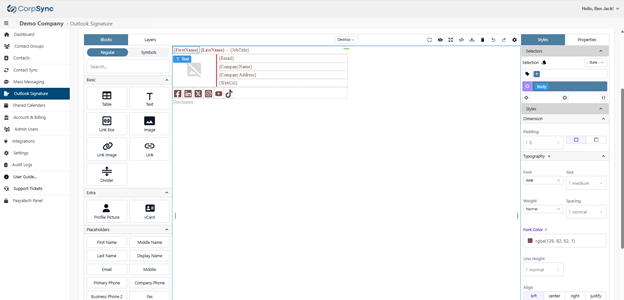
Signature Editor
9. New Pricing
Updated pricing plans have been introduced to provide greater value and flexibility. For detailed information, consult the pricing section or reach out to support for personalized assistance.
Was this article helpful?
That’s Great!
Thank you for your feedback
Sorry! We couldn't be helpful
Thank you for your feedback
Feedback sent
We appreciate your effort and will try to fix the article